


Give any profile tab a glow, ribbon, icon or count.
Pick one tab or section on your member profiles, such as Reviews, and give it a glow, a ribbon, an icon or a count, then choose who can open it. The same effects light up your other plugins too: the sign-up card in Visibility Engine and the sponsor listings in Sponsor Engine.
Built for owners of Brilliant Directories sites who want visitors to notice the part of a profile that earns sign-ups and upgrades.
One tab stands out, the rest stay as they are
What a visitor sees on a profile.
The tab you pick gets your colors, an icon and its count in a pill, with an effect that draws the eye. Visitors who are not allowed to open it get your upgrade message instead.
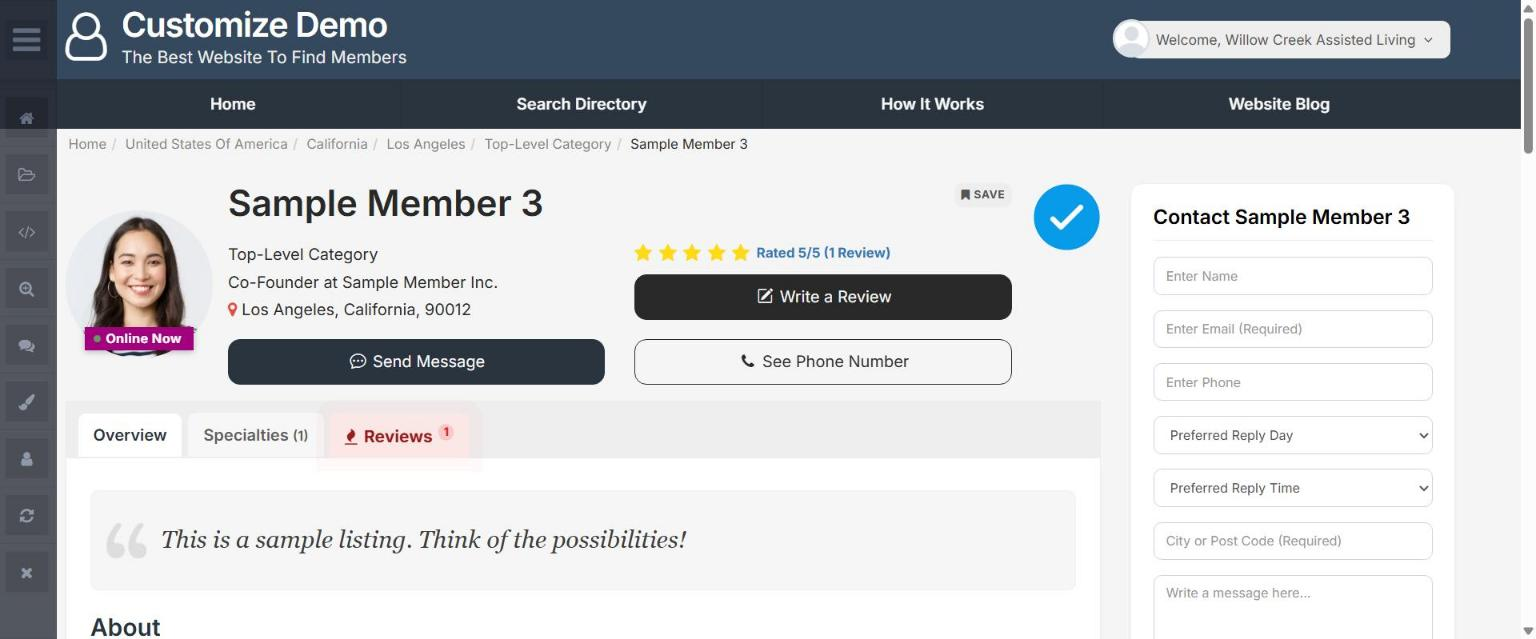
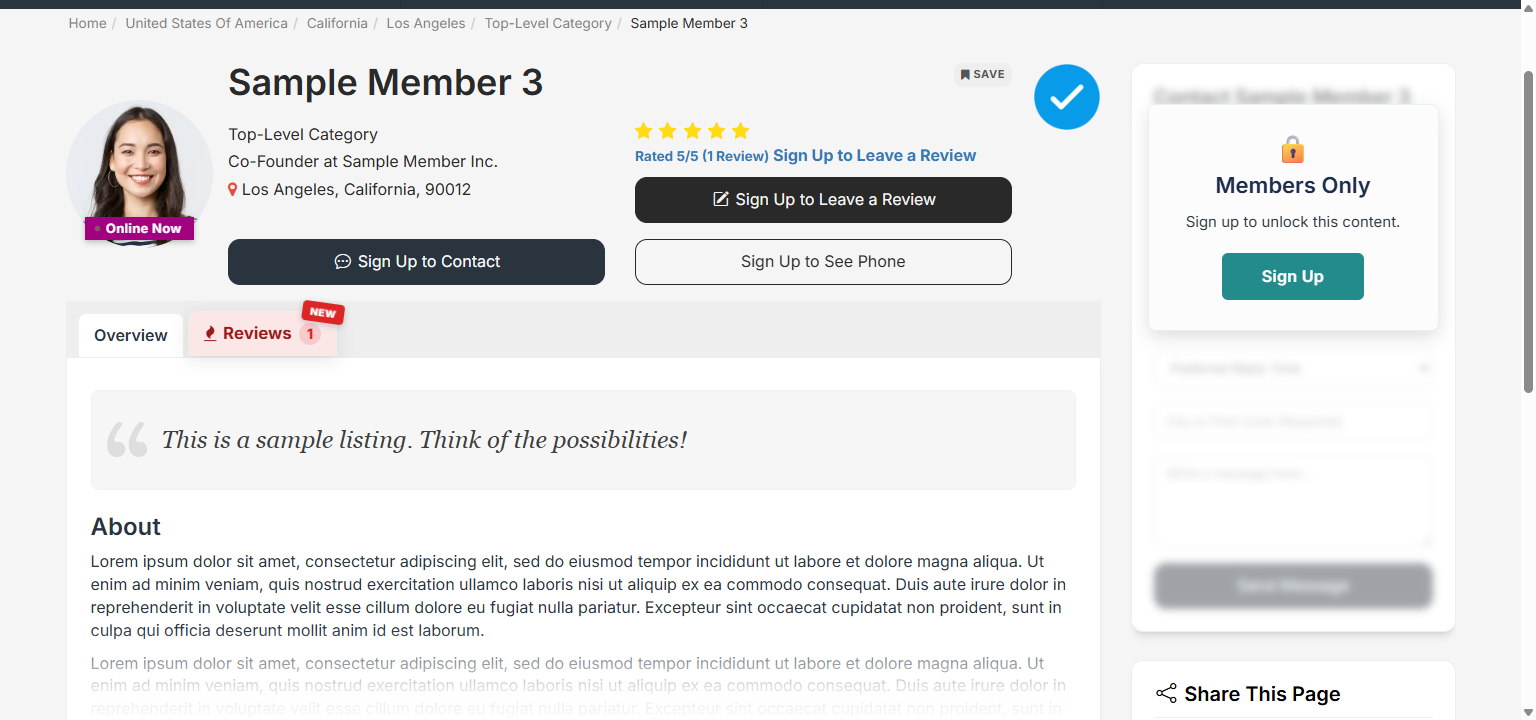
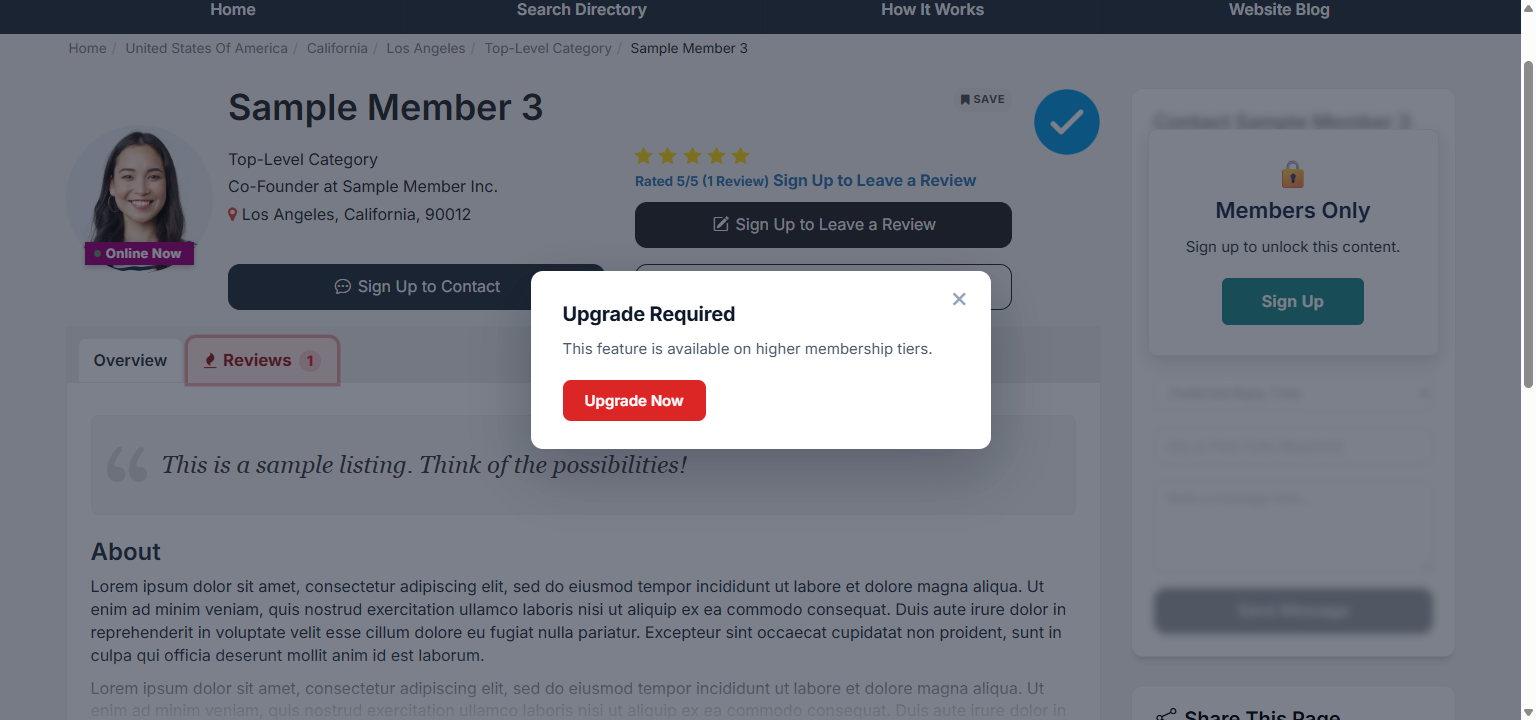
The tab that earns you money, front and center.
Visitors look where something moves or stands out. Highlight puts that on the tab you choose.
Seen first
Give one tab or section a pulsing glow, a gentle throb, a shimmer, a single bounce, an underline or a corner ribbon.
Counts that read at a glance
A tab label like Reviews (12) becomes Reviews with 12 in its own pill, inline or raised.
Your colors and icon
Set the background, text and accent colors, the border, the corners and an icon, or start from a design preset.
Only the profiles you choose
Show the highlight only on profiles of the membership plans you pick, so it marks your paying members.
A reason to upgrade
Let anyone open the tab, only signed-in members, or only certain plans. Everyone else sees your upgrade message and button.
Where it works best
Move the tab to the first or last place, and show the highlight on desktop, on phones or on both.
One set of effects, across your whole site.
On a site that runs our other plugins, Highlight's glow, shimmer, icon and hover lift show up inside them too, switched on from either plugin's settings.


A sign-up box that gets noticed
When Visibility Engine shows its sign-up box over a locked or cut-off profile, the box can carry your Highlight effect. And when it hides tabs from signed-out visitors, your highlighted tab can stay in view next to Overview, so visitors see what they would get by joining.


Sponsors that stand out
Each sponsor level gets its own effect, so Gold sponsors can glow while others stay plain, with an icon before their label and a lift when a visitor points at them. It shows on the county pages you sell, and on search results when Filter Engine is installed.
Out of the box, every profile tab looks the same.
Brilliant Directories draws a member profile's tabs as one plain row: Overview, Reviews, Photos and the rest all in the same style. The tab that proves a member is good, or the one you want visitors to pay for, gets no more attention than the others unless you write code for it.
DirectoryHighlight picks out one tab and makes it the first thing a visitor notices, then decides who can open it. Each setup below is built from its own settings, with the steps to build it in your panel.
Reviews that get read
Visitors land on Overview, and the Reviews tab beside it pulses with a soft glow, shows a flame icon and carries the number of reviews in its own pill. Members with good reviews get them seen, and visitors find the proof without hunting.
Build it
- In Highlight Settings, turn on Enable Highlight.
- Set Target type to Tab and type Reviews in Tab label or selector.
- Set Animation to Pulse glow and turn on Extract (N) as a separate pill.
- On the Design tab, pick an icon and set Background, Text color and Accent color.
A tab that says NEW
An angled ribbon sits on the corner of the tab you choose, saying NEW, HOT or a count such as 27 DATES, so a tab with fresh content gets noticed the moment a profile opens.
Build it
- In Highlight Settings, set Tab label or selector to the tab you want, such as Events.
- Set Animation to Corner ribbon and type your words in Ribbon text.
- Set Tab position to Move to first if it should lead the row.
A members-only tab that sells the upgrade
The tab stands out to everyone, but only the plans you choose can open it. Anyone else who clicks gets a popup with your title, your message and an Upgrade Now button to your membership page.
Build it
- In Highlight Settings, under Access Control, set Click-through access to Specific plans only and pick the Allowed plans.
- Fill in Upgrade popup title, Upgrade popup message and Upgrade button label.
- Set Upgrade button URL to your membership plans page.
Paid profiles that look paid
The highlight shows only on profiles of the plans you pick, so a Gold member's Reviews tab glows while a Basic member's stays plain. Members can see what their plan adds, and Basic members have a reason to move up.
Build it
- In Highlight Settings, under Access Control, open Show highlight on profiles of plans.
- Pick the paid plans whose profiles should get it.
A sign-up card that gets noticed
When Visibility Engine locks part of a profile for signed-out visitors, its sign-up card glows with your Highlight effect, and the highlighted tab stays in view beside Overview while the other tabs are hidden.
Build it
- In Highlight Settings, under Bonus integration with Visibility Engine, turn on Keep highlighted tabs visible when hiding tabs.
- Turn on Apply Highlight effect to sign-up call to action box.
Gold sponsors that glow
On the county pages you sell, Gold sponsors glow with a star before their label and lift when a visitor points at them, while lower levels keep a plain border, so the top spot looks worth its price.
Build it
- In Sponsor Engine, on the Levels tab, open a level and turn on Use its own colors and label.
- Under Highlighter flare, pick the Animation, an Icon before the label and Lift on hover.
Set it up in the panel you already use.
Everything lives in DirectoryCustomize under My Widgets, in the Highlight settings.
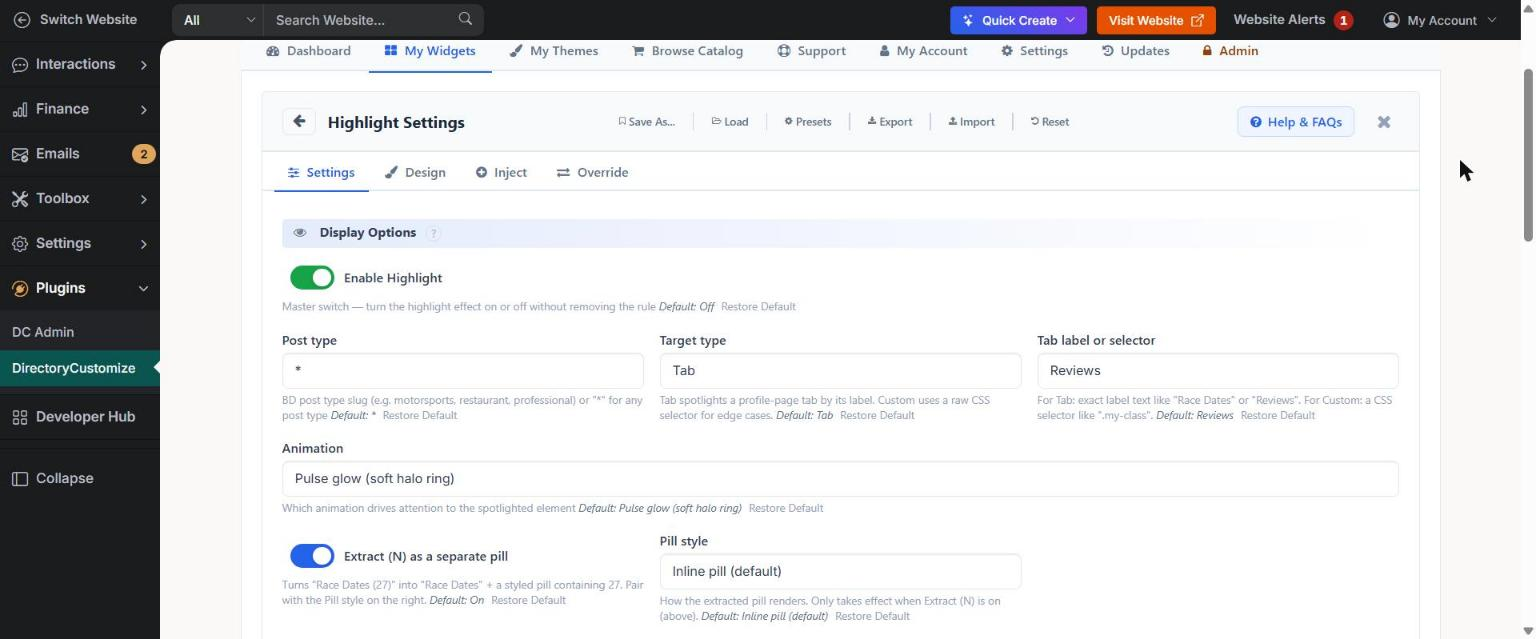
Run down your checklist.
The things buyers compare when they choose a way to make part of a profile stand out. DirectoryHighlight does all of these.
-
Effects that draw the eyePulsing glow, gentle throb, shimmer, single bounce, underline or a corner ribbon.
-
A corner ribbonYour own words on the corner of the tab, such as NEW or HOT.
-
Counts in a pillReviews (12) becomes Reviews with 12 in its own pill, inline or raised.
-
An icon before the labelA Font Awesome icon, an emoji or a dot.
-
Move the tabPut the tab first or last in the row.
-
Desktop, phone or bothShow the highlight where you want it.
-
Only on chosen plansThe highlight shows only on profiles of the plans you pick.
-
A click gateOpen the tab to signed-in members or chosen plans, with your own upgrade message for everyone else.
-
Your designDesign presets, plus your own colors, border, corners and type size.
-
Works with Visibility EngineKeeps the tab in view and styles its sign-up card.
-
Works with Sponsor EngineAn effect for each sponsor level.
A spotlight you set yourself.
Built for owners who want to change what stands out on a profile without paying for custom code each time.
Every new version, on every plan
Updates arrive on their own through DirectoryCustomize. Nothing to reinstall.
Kept working as BD changes
When Brilliant Directories updates its code, we update the plugin to match.
More than a color change
A moving effect, an icon and a count pill on the same tab, set from one panel.
Turns interest into upgrades
The click gate sends visitors without access to your upgrade page.
Change it any time yourself
Pick a new tab, effect or color from the settings panel whenever you like. No new order, quote or developer.
Help for as long as you have it
Technical issues with the plugin are covered on every plan, for as long as you have it.
Makes your other plugins sell harder
The same effects work inside Visibility Engine and Sponsor Engine, so one purchase lifts more than one part of your site.
Monthly, yearly or a one-time fee.
Pick the way you would rather pay. All three get every new version.
Month to month
Monthly
$10
Per month, cancel any time
- Every feature and every new version.
- Stop whenever you like.
Two months free
RecommendedYearly
$100
Per year
- Every feature and every new version.
- $20 less than paying monthly.
Yours to keep
One-time
$320
Once, no renewal
- Every feature and every new version, for good.
- No bill after the first.
Technical issues with the plugin are covered on every plan. Other help and changes are billed at our normal rates.
One price covers the whole spotlight.
- Every effect, the corner ribbon, count pills and icons.
- Your colors, border, corners and type size, with design presets.
- The click gate by sign-in or plan, with your upgrade message.
- Every new version, kept working as Brilliant Directories changes.
The short answers.
What can I highlight?
Can I highlight more than one tab?
Does it work on event or blog pages?
Does the click gate hide what is in the tab?
What if the tab name does not match?
What is the difference between the three plans?
Point every visitor at what you sell.
Questions about setting it up? The help pages walk through every setting, or send us a message.